
If you have ever searched for the best SEO plugin for WordPress, you have probably seen the same two names come up: Rank Math and Yoast SEO. Both are massively popular, both work well – but they are built for different goals.
The choice between Rank Math vs Yoast SEO matters more than most beginners realize. The wrong pick can slow your site, lock features behind expensive upgrades, or make optimization feel harder than it needs to be.
I have used both plugins on live WordPress sites – from small personal blogs to growing content websites. In this comparison, I will walk you through every key difference so you can decide which one actually fits your needs. If you are also looking for other must-have tools, check out our guide on essential WordPress plugins every new website needs.
Table of Contents
Quick Overview: Rank Math vs Yoast SEO
What Is Rank Math?
Rank Math is a WordPress SEO plugin launched in 2019 by MyThemeShop. Despite being newer, it quickly became one of the most installed SEO plugins on WordPress.org. The reason? It offers a huge number of features completely free – features that other plugins charge for.
Rank Math includes a built-in setup wizard, schema markup generator, 404 error monitor, redirection manager, and deep Google Search Console integration – all without paying a cent.
What Is Yoast SEO?
Yoast SEO is the original giant of WordPress SEO. Launched in 2010, it has been around far longer and helped shape how people think about on-page SEO. Its traffic light system (green, orange, red indicators) made SEO feel approachable for beginners.
Yoast is reliable and has an excellent reputation, but many of its best features are locked behind a premium plan that costs $99/year. The free version is solid but limited compared to what Rank Math offers for free.
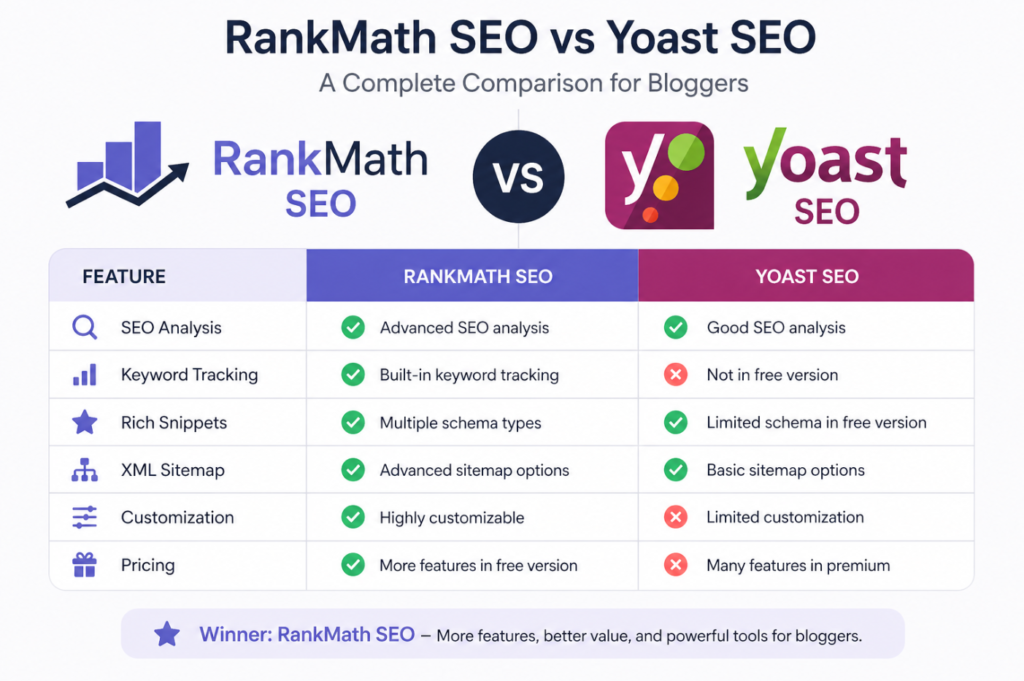
Rank Math vs Yoast SEO: Feature Comparison Table
Here is a side-by-side look at the most important features for WordPress users:
| Feature | Rank Math | Yoast SEO |
| Free Plan | Yes – generous | Yes – limited |
| Pro Price | $6.99/month | $99/year |
| Focus Keywords (Free) | Up to 5 | 1 only |
| Schema Markup | Advanced (free) | Basic (free) |
| Redirection Manager | Built-in (free) | Paid add-on |
| 404 Monitor | Built-in (free) | Not available |
| Local SEO | Included | Paid add-on |
| WooCommerce SEO | Included | Paid add-on |
| Google Search Console | Direct integration | No direct link |
| AI Content Analysis | Yes (pro) | Yes (pro) |
| Setup Wizard | Yes | Yes |
| Beginners Friendly | Very easy | Easy |
| Performance (speed) | Lightweight | Slightly heavier |
| Support | Email + Docs | Email + Docs |
| Best For | Most users | Established sites |
Free Plan Comparison: Rank Math Wins Clearly
This is where the biggest gap exists between the two plugins.
Rank Math’s free version lets you optimize each post with up to 5 focus keywords. Yoast SEO free allows only 1 focus keyword per post. That alone can make a real difference for content that targets multiple related search terms.
With Rank Math free, you also get:
- Schema markup (rich snippets) for articles, FAQs, reviews, and more
- Built-in 404 error monitoring
- Redirection manager (301, 302, 307 redirects)
- Google Search Console data inside WordPress dashboard
- Local SEO support
- WooCommerce SEO support
Yoast SEO free gives you solid basics – meta titles, descriptions, readability analysis, XML sitemap – but most advanced features require the premium version.
Pro Tip If you are just starting your WordPress site and want the most power without spending money, Rank Math’s free plan is hard to beat. You get features that Yoast charges $99/year for.
Ease of Use: Both Are Beginner-Friendly, But Different
Rank Math Setup
Rank Math has a guided setup wizard that walks you through connecting Google Search Console, setting your site type, and configuring basic SEO settings. Most beginners get it fully set up in under 10 minutes.
The post editor interface is clean. You see your SEO score out of 100, a list of what you can improve, and clear guidance on focus keywords, meta titles, and descriptions.
Yoast SEO Setup
Yoast also has a setup wizard and its interface is very familiar to longtime WordPress users. The traffic light system – green for good, orange for improvement, red for issues – is instantly understandable.
Where Yoast shines is its readability analysis. It checks sentence length, passive voice, transition words, and Flesch reading ease. For writers who want help crafting more readable content, this is genuinely useful.
Performance and Site Speed
SEO plugins can affect your page load speed. This matters a lot for WordPress sites – if you want to understand how to fully optimize your site performance, read our guide on how to speed up your WordPress website.
Rank Math is generally considered lighter and faster than Yoast SEO. It adds fewer database queries and loads fewer scripts on the frontend. In most speed tests, Rank Math has a smaller footprint.
Yoast SEO has improved significantly over the years, but it still tends to be slightly heavier – especially if you have multiple Yoast add-ons installed. For high-traffic sites where every millisecond counts, this is worth considering.
Schema Markup: Rank Math Is Significantly Ahead
Schema markup (also called structured data or rich snippets) tells Google exactly what your content is about – whether it is a recipe, product review, FAQ, event, or how-to guide. Rich results in Google can dramatically increase your click-through rate.
Rank Math supports over 20 schema types completely free, including:
- Article, Blog Post, News Article
- FAQ and HowTo
- Product and Review
- Course, Event, Recipe
- Local Business, Person, Organization
Yoast SEO free only supports basic schema (Article, WebPage types). For most rich snippet types, you need Yoast Premium or a separate schema plugin. Rank Math gives all of this for free, which is a major advantage.
Pricing: Rank Math Is More Affordable
Rank Math Pricing
Rank Math Pro starts at $6.99/month (billed annually), which works out to around $83.88/year for unlimited sites. Their Business plan unlocks additional features for agencies and client sites.
Yoast SEO Pricing
Yoast SEO Premium costs $99/year per site. If you run multiple WordPress sites, costs add up quickly. Add-ons like Local SEO ($79/year) and WooCommerce SEO ($79/year) are sold separately on top of that.
For users who need local SEO or ecommerce SEO features, Yoast can get expensive fast – while Rank Math includes these features in its free plan.
Advanced Features Worth Noting
Redirections and 404 Monitoring
Managing broken links and setting up redirects is a normal part of running a website. With Rank Math, you get a full redirection manager and 404 monitor built right in – even on the free plan.
With Yoast SEO, you need to either buy Yoast Premium or install a separate plugin like Redirection. This adds plugin bloat and extra cost.
Google Search Console Integration
Rank Math connects directly to Google Search Console and shows you keyword rankings, impressions, and click data right inside your WordPress dashboard. You do not need to switch tabs to check your SEO performance.
Yoast SEO does not have a built-in GSC integration in the same way. You can see GSC data through Yoast if you use Google Site Kit separately, but it is not as seamless.
Content AI and Keyword Suggestions
Both plugins offer AI-powered content analysis at the pro level. Rank Math’s Content AI suggests related keywords, questions people ask, and content improvement tips based on the current top-ranking pages for your target keyword.
Yoast Premium also introduced AI features, including AI-generated meta descriptions and SEO title suggestions. Both are solid, but they require paid plans.
Common Mistakes to Avoid With Both Plugins
- Ignoring the setup wizard – both plugins have one, and skipping it means missing important configurations like your site type, social profiles, and sitemap settings.
- Keyword stuffing in the meta description – just because the plugin asks for a focus keyword does not mean you should repeat it five times. Write naturally for readers.
- Over-optimizing for plugin scores – a post scoring 100/100 in Rank Math is not automatically going to rank. Content quality and backlinks still matter far more.
- Installing both plugins at the same time – this causes conflicts and duplicate data in your XML sitemap and structured data. Pick one and stick to it.
- Never reviewing 404 errors – use Rank Math’s built-in 404 monitor regularly. Broken pages hurt user experience and can affect rankings over time.
Who Should Use Which Plugin?
Choose Rank Math If You:
- Are building a new WordPress site and want maximum features for free
- Run a WooCommerce store and need product SEO without extra plugins
- Want built-in schema markup, redirects, and 404 monitoring from day one
- Manage multiple websites and want one affordable pro plan for all
- Care about speed and want a lightweight SEO plugin
- Are a beginner who wants a clean, modern interface that guides you step by step
Choose Yoast SEO If You:
- Already use Yoast SEO and have years of historical data in it
- Prioritize readability analysis and need strong guidance on writing style
- Work with clients or a team that is already familiar with the Yoast interface
- Are willing to pay for a premium plan and prefer Yoast’s established ecosystem
Our Recommendation For most beginners and intermediate WordPress users, Rank Math is the better choice in 2026. It offers more features for free, is just as beginner-friendly, and costs significantly less at the pro level. Unless you have a specific reason to use Yoast, Rank Math is the smarter starting point. In case you are looking for hosting do give a try to hostinger.
Frequently Ask Questions (FAQ)
Is Rank Math better than Yoast SEO for beginners?
Yes, for most beginners Rank Math is the better choice. It offers more free features, an intuitive setup wizard, and a clean scoring system that tells you exactly what to fix. You do not need to pay anything to access advanced features like schema markup or the 404 monitor.
Can I switch from Yoast SEO to Rank Math without losing my SEO data?
Yes. Rank Math includes a built-in migration tool that imports all your Yoast SEO settings, meta titles, meta descriptions, and focus keywords automatically. The process takes just a few minutes and no data is lost.
Does Rank Math slow down WordPress?
No, Rank Math is designed to be lightweight. In most performance tests, it has a smaller footprint than Yoast SEO and adds minimal load time. It is one of the fastest SEO plugins available for WordPress.
Is Yoast SEO free version enough for a small blog?
For a simple blog, Yoast SEO free gives you the basics – meta titles, descriptions, XML sitemap, and readability analysis. However, if you want more keywords per post, schema markup, or redirect management without paying, Rank Math free is more capable.
What is the best free SEO plugin for WordPress in 2026?
Based on features available at no cost, Rank Math is the best free SEO plugin for WordPress in 2026. It includes schema markup, 5 focus keywords per post, Google Search Console integration, and a built-in redirection manager – all free.
Do I need both Rank Math and Yoast SEO installed?
No. Installing both plugins at the same time causes conflicts, duplicate sitemaps, and duplicate structured data errors. Always use only one SEO plugin on your WordPress site. Pick the one that best fits your needs and stick with it.
Conclusion
Choosing between Rank Math vs Yoast SEO comes down to one main question: how much do you want to pay for advanced features?
Rank Math gives you more out of the box for free – schema markup, redirections, 404 monitoring, Google Search Console integration, and support for up to 5 focus keywords per post. Its pro plan is also more affordable.
Yoast SEO is reliable and trusted, with excellent readability tools and a long track record. But most of its best features cost extra.
For most WordPress users – especially beginners – Rank Math is the best SEO plugin WordPress has available right now. It is powerful, free to start, and keeps getting better.
Have a question about either plugin? Drop it in the comments below – I read every one. And if this comparison helped you, share it with someone building their first WordPress site.