

Choosing between Elementor and Gutenberg is one of the most common decisions WordPress beginners face – and it is not as simple as it seems. Both tools let you build pages visually, but they work in very different ways and suit very different types of users.
If you have been searching “Elementor vs Gutenberg” trying to make up your mind, this article will give you a clear, honest breakdown so you can stop second-guessing and start building.
We will compare both editors across ease of use, design flexibility, performance, cost, and long-term sustainability – so you walk away knowing exactly which one fits your project.
Table of Contents
What Is Elementor?
Elementor is a drag-and-drop WordPress page builder plugin that has been around since 2016. It works by replacing the default WordPress editor with its own visual interface, where you drag widgets onto a canvas and style everything with point-and-click controls.
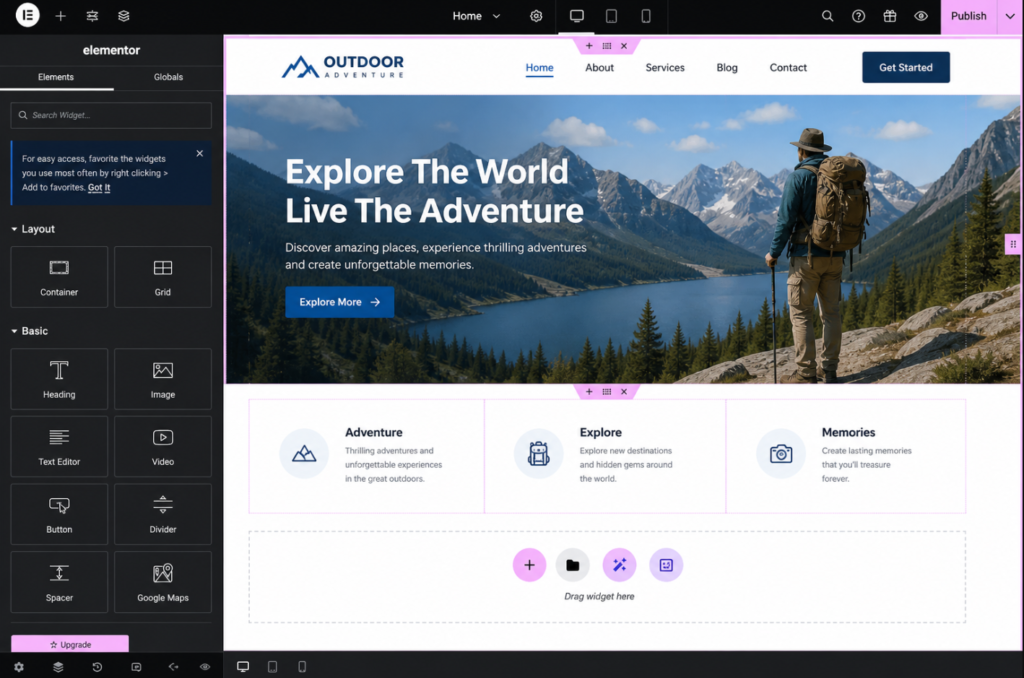
Elementor comes in two versions:
- Elementor Free – Available from the WordPress plugin directory, includes basic widgets and templates.
- Elementor Pro – A paid upgrade that adds advanced widgets like forms, sliders, WooCommerce integration, theme builder features, and more.
It is one of the most installed plugins in the WordPress ecosystem, with over 12 million active installations as of 2026.
What Is Gutenberg?
Gutenberg is the default block editor built into WordPress core since version 5.0 (released in 2018). Unlike Elementor, you do not need to install anything extra – it is already there the moment you set up WordPress.
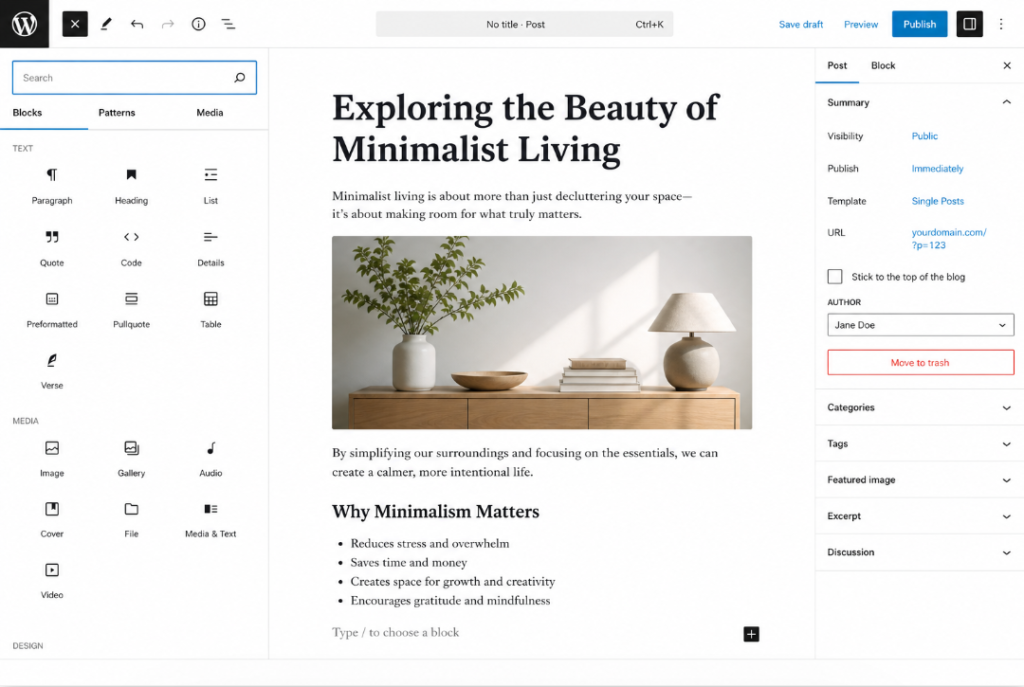
Gutenberg works through a block-based system. Each element – a paragraph, an image, a button, a column – is its own “block” that you add and arrange on the page.
With the introduction of Full Site Editing (FSE) in WordPress 5.9 and its ongoing development through 2025-2026, Gutenberg has grown far beyond just editing blog posts. You can now edit headers, footers, templates, and global styles directly inside the editor.
If you want to see how FSE and block themes work in practice, check out our guide on Gutenberg Block Theme Tutorial.
Elementor vs Gutenberg: Side-by-Side Comparison
Let us look at the key differences across the areas that matter most.
1. Ease of Use
Elementor is genuinely beginner-friendly in a visual sense. You can see exactly what your page looks like as you build it – no surprises when you hit preview. The drag-and-drop interface feels familiar to anyone who has used tools like Canva or Wix.
That said, Elementor adds a layer of complexity over time. Its settings panel has hundreds of options, and beginners often get lost tweaking margins, paddings, and responsive breakpoints.
Gutenberg has a different learning curve. It is simpler at first for writing content (it is essentially a great text editor with blocks), but building full-page layouts feels more limited and less intuitive – especially for users who have no coding background.
Winner: Elementor for page design. Gutenberg for content writing.
2. Design Flexibility
This is where Elementor clearly outperforms Gutenberg – at least out of the box.
Elementor gives you:
- Pixel-level control over spacing, sizing, and positioning
- Over 100 pre-built widgets (Pro version)
- Hundreds of professionally designed templates and theme kits
- Motion effects, sticky elements, pop-ups (Pro)
- Custom CSS per element
Gutenberg, by contrast, has improved significantly but still requires more effort to achieve complex, magazine-style layouts. You can use patterns (pre-built block combinations), global styles, and the Full Site Editor, but the design control is not as granular as Elementor’s.
Winner: Elementor, for complex or highly custom designs.
3. Performance and Site Speed
This is where Gutenberg wins – and it is not even close.
Elementor adds a significant amount of JavaScript and CSS to your pages. Even with caching and optimization, Elementor-built sites tend to load slower than equivalent Gutenberg sites because of the extra code Elementor injects.
Gutenberg outputs clean, minimal HTML. Since it is part of WordPress core, it does not need to load external plugin files in the same way a third-party plugin does.
If site speed is critical for you (and it should be – Google uses it as a ranking factor), Gutenberg is the better choice. For more tips on optimizing your WordPress site, read our article on How to Speed Up Your WordPress Website.
Winner: Gutenberg, by a significant margin.
4. SEO Friendliness
Both editors can produce SEO-friendly content, but the output quality matters.
Gutenberg produces clean, semantic HTML that search engine crawlers love. There is no extra wrapper divs or inline styles cluttering the page.
Elementor, on the other hand, outputs more nested HTML with inline styles. It is not terrible for SEO, but it can create a slightly heavier page that affects Core Web Vitals scores – which do impact rankings.
That said, SEO success depends far more on your content, keyword research, and technical setup than on which editor you use. Pair either editor with a solid SEO plugin. We compared the top two in our article on Rank Math vs Yoast SEO if you want help choosing one.
Winner: Gutenberg, for cleaner output. But both are workable.
5. Cost
Gutenberg: Free. Always. It is part of WordPress core.
Elementor Free: Free, with limited features.
Elementor Pro: Starts at $59/year for one site (pricing varies by plan and number of sites).
If you are on a tight budget – especially when you are just starting – Gutenberg is the obvious winner. Elementor Free is functional but you will quickly hit its limits and feel the pull toward the Pro version.
Pro Tip: If you are just starting out and need affordable, reliable hosting before even worrying about page builders, check out Hostinger – it is one of the most budget-friendly options that comes with a one-click WordPress installer.
Winner: Gutenberg (free), unless you need Elementor Pro features.
6. Long-Term Sustainability
This is an important factor that beginners often overlook.
Gutenberg is the future of WordPress. Automattic and the core team are actively investing in Full Site Editing, block themes, and the block editor. Every new version of WordPress improves Gutenberg further.
Elementor is a third-party plugin. While it is enormously popular and well-maintained, it depends on WordPress staying compatible with it. There have been instances in the past where WordPress core updates caused temporary Elementor conflicts. You are also dependent on Elementor’s company remaining active and updating the plugin.
If you are building a site you expect to run for many years, building with Gutenberg means you are aligned with WordPress’s own direction.
Winner: Gutenberg, for long-term peace of mind.
7. Templates and Pre-Built Designs
Elementor shines here. It offers:
- 300+ free and Pro templates
- Full website kits (header, footer, pages, all pre-styled)
- A thriving third-party template marketplace
Gutenberg has “block patterns” – pre-built block combinations – and with block themes, you can import full theme designs. The WordPress pattern library has grown significantly, but it is not as polished or as extensive as Elementor’s template ecosystem.
Winner: Elementor, for ready-to-use professional designs.
8. WooCommerce Integration
If you are building an online store, Elementor Pro includes a dedicated WooCommerce builder. You can visually design your product pages, cart, checkout, and category pages without touching code.
Gutenberg’s WooCommerce integration is handled through the WooCommerce Blocks plugin, which has improved a lot. It lets you build store pages with blocks but is less flexible visually than Elementor’s approach.
Winner: Elementor Pro, for WooCommerce stores needing heavy customization.
Quick Comparison Table
| Feature | Elementor | Gutenberg |
|---|---|---|
| Cost | Free / $59+ per year | Free (built-in) |
| Ease of Use | Beginner-friendly (design) | Beginner-friendly (content) |
| Design Flexibility | Very High | Moderate |
| Site Speed | Slower | Faster |
| SEO Output | Good | Excellent |
| WooCommerce Builder | Yes (Pro) | Basic |
| Long-Term Direction | Third-party plugin | WordPress core |
| Templates | 300+ | Growing |
When Should You Choose Elementor?
Choose Elementor if:
- You need a professional-looking website quickly with minimal design experience
- Your project requires heavy customization – pop-ups, sliders, custom forms, advanced layouts
- You are building a client website and need a polished template to start from
- You are comfortable paying for Elementor Pro and the value is worth it for your use case
- You are building a WooCommerce store that needs a custom-designed storefront
When Should You Choose Gutenberg?
Choose Gutenberg if:
- You are primarily running a blog or content-heavy site
- Site speed and Core Web Vitals are a priority
- You want to keep your setup lean with fewer plugins
- You are building for the long term and want to stay aligned with WordPress core
- You want full control without paying for extra tools
If you are curious about what a well-built Gutenberg-powered site looks like using block themes, see our Gutenberg Block Theme Tutorial for a step-by-step walkthrough.
Common Mistakes to Avoid
With Elementor:
- Installing too many Elementor add-on plugins – they bloat your site and cause conflicts
- Using Elementor for every page including simple blog posts (unnecessary overhead)
- Forgetting to optimize images placed in Elementor sections, which tanks speed
With Gutenberg:
- Assuming it cannot do anything beyond basic blog posts – FSE has changed this
- Not using block patterns and reusable blocks, which save a lot of time
- Choosing a theme that is not block-compatible, which limits what you can do
Pro Tip: Whichever editor you pick, always test your site on mobile. Both editors have responsive controls, but default settings do not always look good on small screens without manual adjustment.
Frequently Ask Questions (FAQ)
Is Elementor better than Gutenberg for beginners?
It depends on what you are building. For designing full pages with complex layouts, Elementor is easier for beginners because of its visual drag-and-drop interface. For writing blog content, Gutenberg is simpler and faster to use.
Does Elementor slow down WordPress?
Yes, Elementor does add extra JavaScript and CSS files that can slow down your WordPress site compared to Gutenberg. This does not mean Elementor is unusable, but you will need a good caching plugin and image optimization to counterbalance the added load. Our guide on How to Speed Up Your WordPress Website covers exactly this.
Can I use Elementor and Gutenberg together?
Technically yes – you can use Gutenberg for your blog posts and Elementor for specific landing pages or your homepage. However, this approach can increase plugin overhead and sometimes causes CSS conflicts. Keep your approach consistent where possible.
Is Gutenberg good enough to replace Elementor?
For simple to moderately complex sites, yes – especially with Full Site Editing and block themes now mature. For highly custom designs, complex forms, or WooCommerce storefronts, Elementor Pro still offers more out of the box.
Is Elementor free worth using?
Elementor Free is worth using for basic layouts and landing pages. However, many of its most useful features – theme builder, popup builder, advanced widgets – are locked behind Elementor Pro. You will likely feel the limitation fairly quickly.
Which page builder is best for SEO?
Gutenberg produces cleaner HTML output and lighter pages, which benefits Core Web Vitals and site speed – both of which are Google ranking factors. For SEO-focused sites, Gutenberg has an edge. Pair it with a good SEO plugin for best results. See our Rank Math vs Yoast SEO comparison for help choosing one.
Conclusion
There is no single winner in the Elementor vs Gutenberg debate – the right choice depends entirely on what you are building and what you need.
Choose Elementor if you want design power, beautiful templates, and are willing to pay for a premium plugin experience. It is excellent for agencies, freelancers, and anyone who needs a polished site fast.
Choose Gutenberg if you care about site speed, long-term compatibility, keeping costs low, and aligning with the future of WordPress. With Full Site Editing now mature, it is more capable than most people give it credit for.
Our honest recommendation for most beginners: start with Gutenberg. Learn how it works, explore block themes, and only reach for Elementor if you hit a wall that Gutenberg genuinely cannot clear.
Want to take the next step? Check out these related guides:
- Gutenberg Block Theme Tutorial – Build Your First Block Theme
- Best Free WordPress Themes to Try in 2026
- Essential WordPress Plugins Every New Website Needs
Have a question about which editor suits your project? Drop it in the comments below – we read every one.