
Thousands of people start a blog every single day – but very few of them actually make money from it. The difference is not luck. It is the right foundation.
If you want to know how to start a WordPress blog and make money, you are in the right place. This guide walks you through every step – from picking your niche and setting up hosting, to publishing content, getting traffic, and turning your blog into a real income source.
No fluff. No vague advice. Just practical steps that work.
By the end of this article, you will have a clear picture of what it takes to launch a successful WordPress blog – even if you have zero technical experience.
Table of Contents
Why WordPress Is the Best Platform to Start a Blog
Before we jump into the steps, let us address the most common question beginners ask: Which blogging platform should I use?
WordPress (specifically WordPress.org – the self-hosted version) powers over 43% of all websites on the internet. That is not a coincidence.
Here is why WordPress stands out:
- Full ownership – You own your content and your website entirely
- Flexibility – Thousands of themes and plugins let you build any kind of blog
- SEO-friendly – WordPress is built with search engines in mind
- Scalable – Whether you have 10 visitors or 100,000, WordPress handles it
- Monetization-ready – No platform restrictions on how you earn money
WordPress.com vs WordPress.org: Do not confuse the two. WordPress.com is a hosted service with heavy restrictions on monetization. WordPress.org is the self-hosted version – the one you want if you are serious about making money blogging.
Step 1 – Choose a Profitable Niche for Your Blog
This is the step most beginners rush through – and it is the one that matters most.
A niche is simply the specific topic your blog focuses on. The more focused your niche, the easier it is to attract a loyal audience and rank on Google.
How to Pick the Right Niche
Ask yourself these three questions:
- What do I know or enjoy enough to write about consistently?
- Is there an audience actively searching for this topic?
- Can this topic be monetized – through ads, affiliate products, or services?
The sweet spot is where all three answers are “yes.”
Examples of profitable blog niches:
- Personal finance and budgeting
- Health and fitness (specific sub-niches like postpartum fitness or men’s over-40 health)
- Travel on a budget
- WordPress and web development (yes, like this very blog!)
- Food and recipe blogs
- Parenting and family
Pro Tip: Avoid niches that are too broad (like “health”) or too narrow (like “keto recipes for left-handed people”). Use a free tool like Google Trends or Ubersuggest to validate search demand before committing.
Step 2 – Get a Domain Name and Reliable Hosting
Once you have your niche locked in, you need two things: a domain name and a hosting plan.
Choosing Your Domain Name
Your domain name is your blog’s address on the internet (e.g., yourblog.com). Keep these rules in mind:
- Keep it short and easy to remember
- Use your niche keyword if it fits naturally
- Stick with a .com extension if possible
- Avoid hyphens and numbers
Choosing a Hosting Provider
This is where a lot of beginners make mistakes – they go with the cheapest option available and end up with slow load times, poor support, and constant downtime.
For beginners, shared hosting is a perfectly fine starting point. As your blog grows, you can upgrade.
Recommended Host for Beginners: Hostinger offers fast servers, a beginner-friendly control panel (hPanel), and one-click WordPress installation. Their plans are affordable and include a free domain with most packages – which is a great deal when you are just starting out. You can check their latest plans here: Hostinger
What to look for in a hosting plan:
- At least 99.9% uptime guarantee
- Free SSL certificate
- One-click WordPress installer
- 24/7 customer support
- Reasonable renewal pricing (not just introductory)
Step 3 – Install WordPress and Configure Basic Settings
Once you have your hosting and domain set up, installing WordPress takes less than 5 minutes.
How to Install WordPress
Most hosts, including Hostinger, provide a one-click WordPress installer in the control panel. Here is the general process:
- Log in to your hosting control panel (cPanel or hPanel)
- Find the “WordPress Installer” or “Auto Installer” option
- Enter your domain, blog title, and admin credentials
- Click Install – WordPress will be set up automatically
For a more detailed walkthrough, check out our guide on how to install WordPress on any hosting.
Essential Settings to Configure Right Away
After installation, go to your WordPress dashboard and adjust these settings before doing anything else:
- Settings > General – Set your site title, tagline, and timezone
- Settings > Permalinks – Change to “Post name” for cleaner, SEO-friendly URLs
- Settings > Reading – Make sure search engines are set to index your site
- Settings > Discussion – Configure comment settings to reduce spam
Pro Tip: The permalink setting is one of the most overlooked steps. Changing it from the default numeric format to “Post name” (e.g., yoursite.com/post-title) makes a real difference in how Google reads your URLs.
Step 4 – Choose a Theme and Install Key Plugins
Your theme controls how your blog looks. Your plugins control what it can do.
Picking the Right WordPress Theme
You do not need to spend money on a premium theme when you are starting out. Many free themes are clean, fast, and professional.
For a curated list, check out our article on best free WordPress themes. Some solid starting points include Astra, Kadence, and GeneratePress – all of which are lightweight and highly customizable.
What to look for in a theme:
- Fast loading speed
- Mobile responsive design
- Good reviews and active support
- Compatible with popular page builders (like Gutenberg or Elementor)
Must-Have Plugins for a New Blog
Plugins add functionality to your WordPress site. Do not go overboard – stick to what you actually need.
Here are the essential ones to install from day one:
| Plugin | Purpose |
|---|---|
| Rank Math or Yoast SEO | On-page SEO optimization |
| WP Rocket or LiteSpeed Cache | Site speed and caching |
| Wordfence or Solid Security | Security and malware protection |
| UpdraftPlus | Automatic backups |
| Akismet | Spam comment protection |
| WPForms Lite | Contact forms |
For a detailed breakdown of what each plugin does and how to configure it, read our guide on essential WordPress plugins every new website needs.
Step 5 – Plan and Write Your First Blog Posts
Now the fun begins. But before you start writing randomly, you need a content strategy.
Understanding Search Intent
Every blog post you write should target a specific keyword – a phrase people are actually searching on Google. Use free tools like:
- Google Search (autocomplete + “People Also Ask”) – Free and underrated
- Ubersuggest – Good keyword data for free
- Ahrefs Webmaster Tools – Free version with solid backlink and keyword data
Match your content to what the reader actually wants. If someone searches “how to fix WordPress white screen,” they want a clear troubleshooting guide – not a 3,000-word essay on WordPress history.
How to Structure a Blog Post That Ranks
Follow this structure for every post:
- Hook – Grab attention in the first paragraph
- Problem – Acknowledge what the reader is struggling with
- Solution – Walk them through the answer clearly
- Proof – Add real examples, data, or screenshots
- CTA – Tell them what to do next
Keep paragraphs short (2-4 lines). Use H2 and H3 headings to break content into sections. Add images where helpful.
Pro Tip: Aim to publish at least 2-3 solid posts before you launch your blog publicly. A blog with one article does not build trust – with readers or with Google.
Step 6 – Optimize Your Blog for SEO
Writing great content is only half the job. You need SEO to get that content in front of people.
On-Page SEO Basics
- Place your focus keyword in the title, first 100 words, one H2, and the meta description
- Use your keyword naturally throughout – do not force it
- Add alt text to all images
- Link to relevant internal articles on your own blog
- Keep your URLs short and descriptive
Technical SEO for WordPress
Technical SEO sounds intimidating but the basics are straightforward:
- Site speed – A slow blog kills rankings. See our detailed guide on how to speed up your WordPress website
- SSL certificate – Your site must load on HTTPS (most hosts provide this free)
- Mobile optimization – Google uses mobile-first indexing, so your site must look great on phones
- XML Sitemap – Submit your sitemap to Google Search Console so Google can crawl your posts
Choosing the Right SEO Plugin
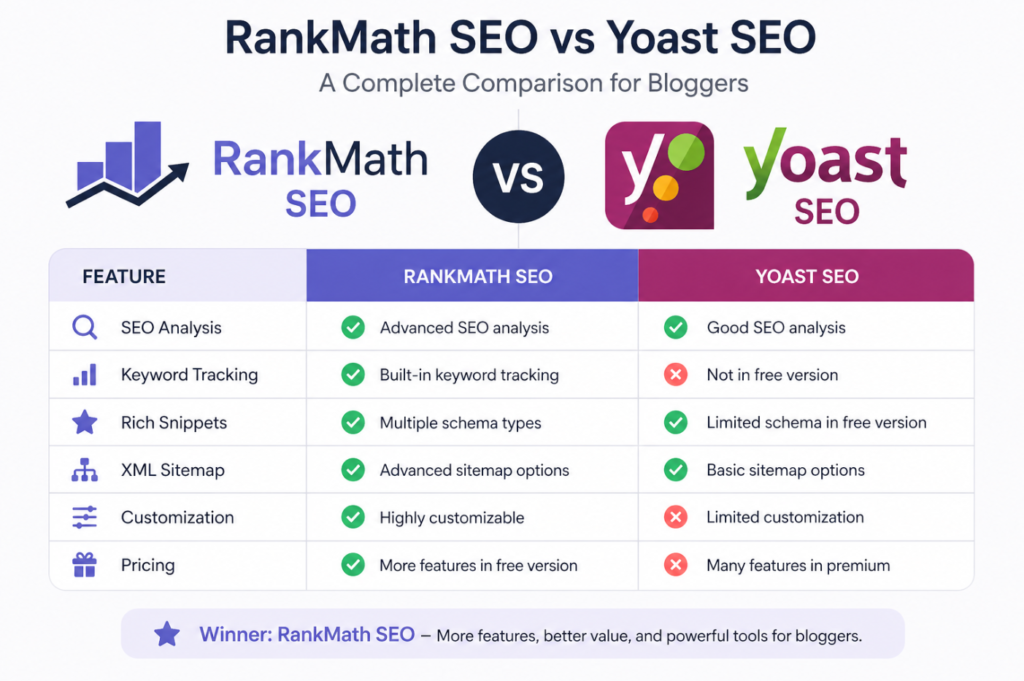
Two plugins dominate this space: Rank Math and Yoast SEO. Both are solid choices – but they have real differences. We have a detailed comparison at Rank Math vs Yoast SEO to help you decide which one fits your workflow.
Step 7 – How to Make Money Blogging on WordPress
This is what most people are here for. Let us get into the real monetization strategies that actually work.
The most important thing to understand: you need traffic before you can make money. Do not rush to monetize a brand-new blog with zero visitors. Focus on building content and SEO first – income follows audience.
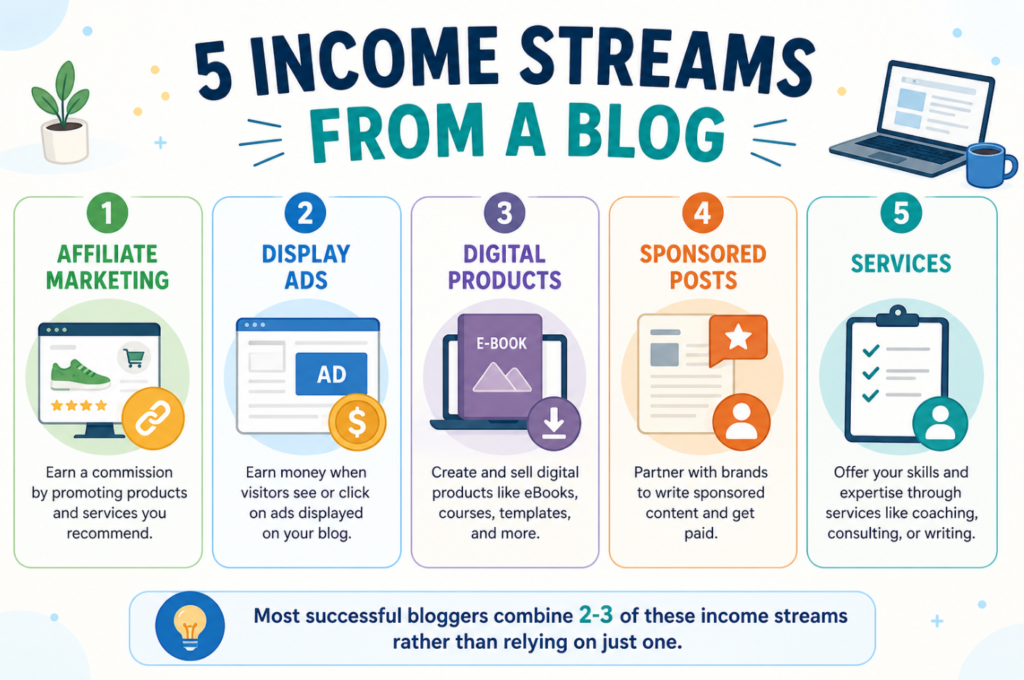
That said, here are the most reliable ways to make money blogging:
1. Affiliate Marketing
You recommend products or services in your content. When a reader clicks your link and makes a purchase, you earn a commission. No customer service, no inventory, no hassle.
This is one of the best options for beginners because you can start with zero budget.
How to get started:
- Sign up for affiliate programs related to your niche (Amazon Associates, ShareASale, Impact, etc.)
- Write product reviews, comparison articles, and how-to guides that naturally include your affiliate links
- Always disclose your affiliate relationships – it is both legally required and builds trust
2. Display Advertising
You place ads on your blog and earn money based on impressions or clicks. Google AdSense is the easiest to get approved for when starting out. Once your traffic grows (typically 25,000+ monthly sessions), you can apply to premium networks like Mediavine or Raptive for much higher payouts.
3. Selling Digital Products
Once you have an audience, selling your own products is the most profitable monetization method. Examples include:
- eBooks and guides
- WordPress templates or themes
- Online courses and workshops
- Printables and digital downloads
You keep 100% of the revenue (minus payment processing fees).
4. Sponsored Content
Brands pay you to write articles that feature their product or service. Rates vary widely – a blog with 10,000 monthly readers might earn $150-$500 per sponsored post. A blog with 100,000 monthly readers can command $1,000-$5,000+ per post.
5. Offering Services
Your blog can also be a lead generation tool for freelance services. If you blog about WordPress, you can offer:
- WordPress setup and customization
- SEO audits
- Content writing
- Website maintenance
Many bloggers earn their first income through services – long before ad revenue or affiliate income kicks in.
Step 8 – Keep Your Blog Secure and Backed Up
This step gets skipped far too often – until something goes wrong.
A hacked blog or a corrupted database can wipe out months of work in seconds. Take basic security seriously from day one.
- Install a security plugin (Wordfence or Solid Security are both reliable)
- Enable two-factor authentication on your admin account
- Keep WordPress, themes, and plugins updated at all times
- Set up automatic backups with UpdraftPlus (at least weekly)
- Use a strong, unique password for your wp-admin login
For a full walkthrough, read our WordPress security guide.
Common Mistakes Beginners Make (and How to Avoid Them)
Learning from others’ mistakes saves you months of wasted effort. Here are the most common ones:
- Starting without a niche – A blog about “everything” ranks for nothing. Pick a clear focus.
- Choosing cheap or unreliable hosting – Slow hosting tanks your SEO and frustrates readers.
- Publishing one or two posts and waiting for traffic – SEO takes time. Aim for 20-30 solid posts before expecting organic traffic.
- Ignoring email list building – Your email list is the one audience you truly own. Start collecting emails from day one, even if you have no subscribers yet.
- Obsessing over design instead of content – A clean, simple theme is enough. Write more. Customize less.
- Not linking internally – Internal links help both readers and Google understand your content. Every new post should link to at least 2-3 older articles.
Frequently Ask Questions (FAQ)
How long does it take to make money from a WordPress blog?
Most bloggers see their first income between 6 to 12 months. It depends on how consistently you publish, how well you target keywords, and which monetization methods you use. Affiliate marketing and services tend to pay off faster than ad revenue.
Do I need coding skills to start a WordPress blog?
No. WordPress is designed for non-technical users. You can set up a fully functional blog using the dashboard, themes, and plugins – no code required. That said, basic HTML knowledge is a small advantage, not a requirement.
How much does it cost to start a WordPress blog?
The minimum cost is your domain name (around $10-15 per year) and hosting (starting at around $3-10 per month depending on the provider). Most essential plugins are free. You can realistically launch a solid blog for under $50 in the first year.
What is the best hosting for a new WordPress blog?
For beginners, shared hosting from a reliable provider is more than enough. Look for one that offers fast servers, one-click WordPress installation, free SSL, and responsive support. Hostinger is a popular choice among new bloggers for its balance of price and performance. Check their current plans here.
How many blog posts do I need before I start getting traffic?
There is no magic number, but 20-30 well-researched, SEO-optimized articles gives Google enough content to understand what your blog is about and start ranking your posts. Focus on quality over quantity – one thorough 2,000-word post is worth more than five thin 300-word articles.
Is WordPress good for SEO?
Yes – WordPress is one of the most SEO-friendly platforms available. With the right permalink settings, an SEO plugin like Rank Math, and attention to technical fundamentals like site speed and mobile optimization, WordPress gives you all the tools you need to rank well on Google.
Conclusion
Starting a WordPress blog and making money from it is not a get-rich-quick path – but it is a very real and achievable one. Thousands of people have built full-time incomes, and even multi-million dollar businesses, starting from exactly where you are right now.
To recap what we covered:
- Choose a focused, profitable niche
- Get reliable hosting and a clean domain (we recommend Hostinger for beginners)
- Install WordPress and configure your settings properly
- Pick a fast theme and install only the plugins you need
- Write SEO-optimized content consistently
- Monetize through affiliate marketing, ads, digital products, or services
- Keep your blog secure and backed up
The most important step? Starting. Every successful blogger once had zero posts, zero traffic, and zero income.
Ready to go deeper? Check out these related guides:
- How to Install WordPress on Any Hosting
- Essential WordPress Plugins Every New Website Needs
- How to Speed Up Your WordPress Website
- Best Free WordPress Themes
Have a question or already started your blog? Drop a comment below – we read every one.