
Your website visitors want to reach you – but if your contact form is broken, ugly, or confusing, they’ll leave without ever sending a message. Choosing the right contact form plugin for WordPress matters more than most beginners realize.
In this guide, you’ll find the best contact form plugins for WordPress – both free and paid – tested and compared so you can pick the right one for your site without wasting hours on research.
Whether you’re building your first blog or running a small business site, there’s a perfect option here for you.
Table of Contents
Why Your WordPress Site Needs a Good Contact Form Plugin
WordPress does not come with a built-in contact form. You need a plugin for that. But not just any plugin – you want one that:
- Loads fast and does not slow down your site
- Sends email notifications reliably
- Looks good on mobile devices
- Is easy to set up, even for beginners
- Protects your form from spam
A poorly set up contact form is one of the most common mistakes new WordPress users make. I’ve seen sites where the form looks fine but emails never actually arrive in the inbox – all because of misconfigured settings. That’s a real problem that costs you leads and trust.
Pro Tip: Pair your contact form plugin with a reliable SMTP plugin (like WP Mail SMTP) to make sure form emails always land in inboxes, not spam folders.
Also, before you even install a plugin, make sure your WordPress hosting is solid. A slow server will make any form feel sluggish. If you haven’t chosen hosting yet, Hostinger offers fast, beginner-friendly plans that work great with WordPress.
How We Evaluated These Plugins
Before jumping into the list, here’s what we looked at for each plugin:
- Ease of use – Can a beginner set it up in under 10 minutes?
- Features – What’s included in the free version vs paid?
- Performance – Does it add unnecessary bloat to your site?
- Spam protection – Does it include CAPTCHA or honeypot?
- Support and updates – Is it actively maintained?
We also looked at active installation numbers, user ratings on WordPress.org, and real-world experience using these plugins on live sites.
The 7 Best Contact Form Plugins for WordPress
1. WPForms – Best Overall (Beginner-Friendly)
Best for: Beginners who want a powerful form builder without touching code
WPForms is the most popular drag-and-drop form builder for WordPress, and for good reason. The interface is genuinely easy to use. You pick a template, customize your fields, and embed the form – it takes about 5 minutes.
Free version includes:
- Drag-and-drop builder
- Basic contact and feedback forms
- Spam protection (honeypot)
- Mobile-responsive forms
Paid version (WPForms Pro) adds:
- Conditional logic
- File uploads
- Payment integrations (Stripe, PayPal)
- Multi-page forms
- Email marketing integrations (Mailchimp, AWeber)
- Priority support
Pricing: Free on WordPress.org | Pro starts at $49.50/year
Verdict: If you want the smoothest experience with the least friction, WPForms is the one to start with. The free version is genuinely useful, and the Pro version is worth it for business sites.
2. Contact Form 7 – Best Free Option (Simple and Lightweight)
Best for: Developers and users comfortable with basic configuration
Contact Form 7 has been around since 2009 and has over 5 million active installations. It’s completely free, always has been, and it works.
That said, it’s not the easiest plugin for true beginners. You configure forms using shortcode-style tags rather than a visual drag-and-drop editor. Once you understand the pattern, it’s fast to use – but there’s a small learning curve.
What you get for free:
- Unlimited forms
- Basic spam filtering (with reCAPTCHA support)
- AJAX form submission
- Flexible email configuration
- Support for file attachments
What it lacks:
- No visual form builder
- No built-in conditional logic
- No entry storage (form submissions are not saved to your database by default)
- Styling requires custom CSS
Pricing: 100% free
Verdict: Contact Form 7 is an excellent choice if you’re budget-conscious and comfortable doing a bit of manual setup. For pure beginners, it can feel limiting compared to WPForms.
Pro Tip: Install the “Flamingo” plugin (by the same developer) alongside Contact Form 7 – it saves all form submissions to your WordPress database, which CF7 alone doesn’t do.
3. Gravity Forms – Best for Advanced Users and Developers
Best for: Agencies, developers, and complex business forms
Gravity Forms is one of the most powerful form plugins available for WordPress. It handles multi-step forms, complex conditional logic, calculations, quiz forms, payment collection, and deep integrations with CRM tools and email platforms.
It’s not for everyone – it’s exclusively a paid plugin and the interface is denser than WPForms. But if you need serious form functionality, Gravity Forms delivers.
Key features:
- Advanced conditional logic
- Calculations and math fields
- Post submissions via form
- 30+ integrations (Stripe, PayPal, HubSpot, Salesforce, Zapier)
- Developer-friendly with hooks and a REST API
- Save and continue forms (users can finish later)
Pricing: Starts at $59/year (Basic) | $159/year (Pro) | $259/year (Elite)
Verdict: If you’re building a complex site – membership site, job board, event registration, payment form – Gravity Forms is worth the investment. For a simple contact form, it’s overkill.
4. Fluent Forms – Best Value for Money
Best for: Users who want WPForms-like features at a lower price
Fluent Forms is a newer player but it has quickly become one of the best-reviewed contact form plugins on WordPress.org. The free version is surprisingly generous, and the Pro plan is very affordable compared to WPForms or Gravity Forms.
Free version includes:
- Drag-and-drop builder
- 30+ input field types
- Conditional logic (basic)
- Email notifications
- CAPTCHA and spam protection
- Form submission storage
- Calculator forms
Pro version adds:
- Payment integrations
- Advanced integrations (Mailchimp, ActiveCampaign, HubSpot, Slack)
- Conversational forms
- Survey and quiz forms
- Priority support
Pricing: Free on WordPress.org | Pro starts at $79/year (covers unlimited sites)
Verdict: Fluent Forms gives you the best free-to-paid ratio of any plugin on this list. Its free tier alone beats what many paid plugins offer. Highly recommended if you’re watching your budget.
5. Ninja Forms – Most Flexible Free Builder
Best for: Users who want a free visual builder with room to grow
Ninja Forms takes a modular approach – the core plugin is free, and you pay only for the add-ons you actually need. This is great in theory, but the costs can add up if you need multiple add-ons.
Free version includes:
- Visual drag-and-drop builder
- Unlimited forms and submissions
- Basic email notifications
- Anti-spam measures
- Basic conditional logic
Paid add-ons available:
- PayPal and Stripe payments
- Multi-step forms
- CRM integrations (Salesforce, HubSpot, Zoho)
- Advanced email marketing (Mailchimp, AWeber, Constant Contact)
- Front-end post submission
Pricing: Free core | Individual add-ons start at $49/year | All-in-one plans from $99/year
Verdict: Ninja Forms is a solid free option for building a visual contact form without paying upfront. Just be aware that the add-on model can get expensive if you need advanced features.
6. Formidable Forms – Best for Data-Heavy Applications
Best for: Sites that need to display or process form submission data
Formidable Forms is unique because it’s not just a contact form plugin – it’s a full form data management tool. You can collect data via forms and display that data on the front end using “Views.” Think: job listing boards, directory listings, searchable databases, and calculators.
Key features:
- Advanced form builder with 25+ field types
- Data Views (display form data as tables, listings, calendars)
- Visual report graphs
- Calculator and quiz forms
- WooCommerce integration
- API and Zapier support
Pricing: Free on WordPress.org | Pro starts at $79.50/year
Verdict: If your site needs to do something beyond “collect and email a form submission” – like build a user-generated directory or display dynamic data – Formidable Forms is unmatched.
7. HappyForms – Best Truly Minimal Free Option
Best for: Sites that just need a dead-simple contact form, nothing more
HappyForms is a no-frills contact form plugin that integrates directly with the WordPress Customizer. There’s no separate admin panel to learn – you build and preview your form right alongside your live site.
Free version includes:
- Simple, clean form builder inside the Customizer
- Live preview while building
- Spam protection
- Email notifications
- Minimal codebase (very lightweight)
Pricing: Free on WordPress.org | Pro from $39/year
Verdict: If you just need a simple contact form and don’t want to deal with complex plugin dashboards, HappyForms is the cleanest option. It won’t win on features, but it wins on simplicity.
Contact Form 7 vs WPForms: Which One Should You Choose?
This is one of the most common questions we see from WordPress beginners – and it deserves a direct answer.
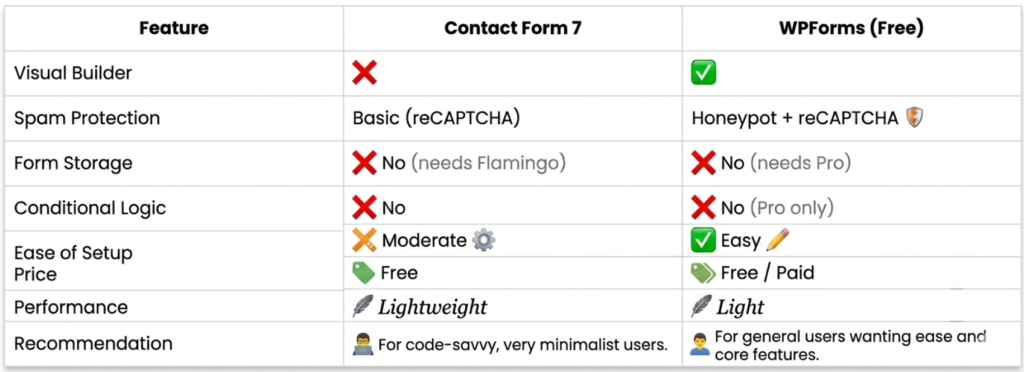
| Feature | Contact Form 7 | WPForms (Free) |
|---|---|---|
| Visual Builder | No | Yes |
| Spam Protection | Basic (reCAPTCHA) | Honeypot + reCAPTCHA |
| Form Storage | No (needs Flamingo) | No (needs Pro) |
| Conditional Logic | No | No (Pro only) |
| Ease of Setup | Moderate | Easy |
| Price | Free | Free / Paid |
| Performance | Lightweight | Light |
Choose Contact Form 7 if: You’re comfortable with a bit of manual configuration, want the most lightweight option, and don’t need a visual builder.
Choose WPForms if: You’re a beginner, want a polished drag-and-drop experience, and may need to upgrade to more features later.
Both are excellent – it really comes down to your comfort level and workflow.
WPForms Alternatives Worth Knowing About
If WPForms isn’t the right fit, here are quick alternatives based on specific needs:
- Budget-conscious? – Fluent Forms Pro covers unlimited sites for less than WPForms covers one.
- Need complex forms? – Gravity Forms is the pro-level choice.
- Want free with a visual builder? – Ninja Forms or HappyForms.
- Building a data-driven app? – Formidable Forms.
The “best” plugin depends entirely on what you need your form to do.
Things to Avoid When Setting Up Contact Forms in WordPress
These are real mistakes I’ve seen people make – and they cost them leads and site performance:
1. Not testing the form after setup Always send a test submission to yourself. Many forms look correct but never deliver emails. Check both your inbox and spam folder.
2. Skipping spam protection An unprotected form will be hit by spam bots within days. Use at minimum a honeypot field, and ideally reCAPTCHA.
3. Using too many fields Every extra field you add reduces form completions. For a basic contact form, Name, Email, and Message is usually enough.
4. Not storing form submissions What if your email delivery fails? If you’re not storing submissions to your database, those leads are gone forever. WPForms Pro, Fluent Forms, and Ninja Forms all offer this. For Contact Form 7 users, install Flamingo.
5. Installing too many form plugins Pick one and stick with it. Running multiple form plugins slows your site and creates conflicts.
For more on keeping your site secure and running smoothly, read our guide on essential WordPress plugins every new website needs.
Does Your Hosting Affect Contact Form Performance?
Yes – and this is something most plugin comparison posts skip entirely.
Your contact form’s email delivery, page load speed, and overall reliability are all influenced by your hosting environment. A cheap shared hosting plan with poor server performance will:
- Slow down form loading times
- Have higher chances of form emails landing in spam (due to poor IP reputation)
- Cause timeouts on form submissions under load
If you’re serious about running a WordPress site that actually works well, invest in quality hosting from the start.
For step-by-step help, check out our guide on how to install WordPress on any hosting.
Quick Comparison: All 7 Plugins at a Glance
| Plugin | Free Version | Visual Builder | Form Storage | Price (Pro) |
|---|---|---|---|---|
| WPForms | Yes | Yes | Pro only | From $49.50/yr |
| Contact Form 7 | Yes (fully free) | No | No (Flamingo needed) | Free |
| Gravity Forms | No | Yes | Yes | From $59/yr |
| Fluent Forms | Yes | Yes | Yes | From $79/yr (unlimited sites) |
| Ninja Forms | Yes | Yes | Yes | From $99/yr |
| Formidable Forms | Yes | Yes | Yes | From $79.50/yr |
| HappyForms | Yes | Yes (Customizer) | No | From $39/yr |
Frequently Ask Questions (FAQ)
What is the best free contact form plugin for WordPress?
For pure beginners, WPForms Lite is the best free option because of its visual builder and ease of use. If you’re comfortable with a bit of manual setup, Contact Form 7 is the most lightweight free choice with over 5 million active installs.
Is Contact Form 7 still worth using in 2026?
Yes – Contact Form 7 is still actively maintained and perfectly functional. It’s lightweight, free, and reliable. The main limitation is the lack of a visual builder and no built-in form submission storage. Adding the free Flamingo plugin resolves the storage issue.
What is the best WPForms alternative?
Fluent Forms is the closest WPForms alternative in terms of features and ease of use, but at a lower price – especially for the Pro plan which covers unlimited sites. Ninja Forms is another strong free alternative with a visual builder.
Do WordPress contact form plugins slow down my site?
Some do, some don’t. Lightweight options like Contact Form 7 and HappyForms add minimal overhead. Heavier plugins like Gravity Forms and Formidable Forms load more scripts. You can check the impact using tools like GTmetrix before and after installation. For a broader performance fix, see our guide on how to speed up your WordPress website.
Which contact form plugin works best with page builders like Elementor?
WPForms, Fluent Forms, and Gravity Forms all have native Elementor widgets, making them the easiest to embed inside Elementor-built pages. Contact Form 7 can also be embedded via shortcode. Learn more about Elementor in our Elementor vs Gutenberg comparison.
How do I stop WordPress contact form spam?
Use a plugin that supports reCAPTCHA v3 or a honeypot anti-spam field. WPForms includes honeypot protection in the free version. Contact Form 7 supports Google reCAPTCHA. For aggressive spam, consider adding Cloudflare Turnstile as an extra layer.
Conclusion: Which Contact Form Plugin Should You Install?
Here’s the short version:
- New to WordPress? Start with WPForms Lite – it’s the most beginner-friendly option with zero frustration.
- On a tight budget? Use Contact Form 7 (free forever) or Fluent Forms for the best free features.
- Running a business site? Go with WPForms Pro or Gravity Forms for reliability and advanced features.
- Building something data-heavy? Formidable Forms is in a class of its own.
No single plugin wins for everyone. But if I had to recommend one to a complete beginner, I’d say install WPForms Lite today, get your contact form live, and upgrade later if you need more.
Also make sure your site is on a reliable host before installing anything. A great plugin on a bad server still gives a bad experience. Hostinger is a solid starting point if you’re still setting things up.
Have a question about contact forms or a plugin you think deserves a spot on this list? Drop it in the comments below – I read every one.
And if you found this guide helpful, check out our roundup of essential WordPress plugins every new website needs and our list of the best WordPress backup plugins to keep your site protected.